Showing posts with label Articles. Show all posts

3 Important Requirements in Applying as a Reseller for Authorize.net

Mar 9, 2010

Shopping cart developers, point-of-sale developers, web developers, web hosting firms, cyber service providers, systems integrators and better-quality resellers, independent software vendors and anyone with merchant customers are the qualified resellers for Authorize.net. You only need a merchant bank account, a payment gateway and a shopping cart to acquire a reseller program.

Qualified individuals who buy authorize.net are given the consent to set up an Authorize.net account that can manage their clients and register new ones for their payment gateway and as well as e-check services. They help new merchant account applicants by answering questions and providing important details on merchant accounts or payment gateway services. Not just anyone can be resellers of Authorize.net. If you are one of the following with the requirements mentioned below, then you are fit to do the job

Qualified resellers
Shopping cart developers
They are brains behind a software application that allows online customers to place a product in a cyber basket and filing an order for it. The payment is non-cash for customers and it is credited to the merchant account itself.

Point-of-sale system developers
This time, transaction isn’t made online but through direct business. The transaction is done with the aid of retail business equipments such as credit card terminals, cash registers, optical and bar code scanners, magnetic card readers and computers. The developers of such technologies are qualified to become a reseller in Authorize.net.

Web developer
A web developer is an engineer for software and he develops World Wide Web applications and programs that run from the web server to the web browser.

Web hosting firms
Web hosting firm is a destination for websites and web services with problems. They provide Web Hosting tools such as website designs, security, consumer reviews, ratings, and post-sale comments and round-the-clock customer support. The people who make this possible are one step closer to being an Authorize.net reseller.

Cyber service providers
An Internet service provider or commonly abbreviated as ISP or sometimes referred as Internet access provider (IAP), is a company that provides internet access to its customers and other cyber affiliates.

Systems integrators and value-added resellers
 Value-added also means better-quality. So, the name speaks for itself. These persons specialize in unifying component subsystems and making sure that those subsystems function well together. Instead of having many applications, one information technology will do the trick for the necessary software and transactions.

Independent software vendors

They are largely known as ISVs who are dedicated to making and selling software, appropriate for mass marketing or for niche markets. They offer exceedingly beneficial merchandise for individual companies and professionals in their chosen field via online.

Anyone with merchant customers
These refer to the certified owners of an online business that transacts through credit or debit card processing. They sell merchandise or provide services to their clients via the World Wide Web.

Requirements for Application

Merchant bank account
This type of bank account will be the destination of the payments agreed online for your business.

Payment gateway
A merchant account may also come with a payment gateway. This software makes it possible to accept payments through your client’s credit card.

Shopping cart
A shopping cart is a software application that allows an online customer to put in their specified orders in a basket as if he is shopping in a typical grocery. This is linked to your merchant account as it manages all credit card payments and it also comes with a security program that shields the credit card information and data of the customer and the seller.
If you are equipped with the qualities and the requirements above then sign up for a position as a leading reseller in Authorize.net. You will not only earn from it but you will also put those talents in good use.
READ MORE - 3 Important Requirements in Applying as a Reseller for Authorize.net

4 Unique Science Project Ideas for a More Interesting Science Fair

Mar 1, 2010

Applying the human’s circulatory system to a car’s control-system design, making a snail’s mermaid necklace into a useful material, and using biotechnology as experimental product testers are some of the most unique project ideas for are a more interesting science fair project.

Interesting science fair projects require of having unique ideas to be able to catch interest and attention during science fairs. Developing a unique idea entails a lot of brainstorming about the general interest of people. Such unique idea should also be timely with the current concern of the society to draw attention. Examples of unique ideas for unique science fair projects are pointed out below:

Applying the human’s circulatory system to a car’s control-system design

When one would derive ideas from a technological genius like mother nature, it would likely result to a unique project. The latest technology provides complicated systems that can only be beneficial to a one sided degree. In relation to the demand of a more innovative control-system vehicles, an idea of understanding a person’s heartbeat would lead to a more efficient control-system designs among cars. The circulatory system has a variety of control schemes that enable a person to react for safety or survival. Applying this idea on a car’s control feature would promote safety and unique innovation. Introducing this ideas as an intial science fair project could be a unique starting point for the development of a more unique integrated designs that is generally demanded today.

Making a snail’s mermaid necklace into a useful material

Who would ever thought that a common snail called whelk could produce something useful? The snail’s gooey remains is called mermaid necklace. The discovery of mermaid necklace as a strong elastic substance had led to open possibilities of more scientific innovation. It has been proven that mermaid necklace from whelk snails have a strength compared to that of a plastic and are elastic as rubber. From these facts one could already think of limitless useful products and materials that can benefit from the mermaid necklace’s characteristics. Since the usefulness of mermaid necklace is not a common knowledge, products or materials made from these substance could be one of the most unique science fair project you could develop.

Using biotechnology for experimental product testing

Biotechnology has greatly reached advance innovation mostly for the development of human welfare. Biotechnological advancement have also gained popular criticisms and issues. While most pharmaceutical, chemical, and cosmetic companies used animals to test their products, it is most beneficial to develop biotechnological species as product tester in replacement for animals. Developing this species for the latter cause mentioned earlier would be for the common good. With this principle in mind, one could easily develop a unique scientific project topic for science fair projects that would surely catch the interest of animal rights advocates and pet lovers alike.

From this informative unique science fair project ideas you could surely have a lot of project topic in mind. Be sure that before proceeding to developing a topic, references and materials should be enough to be able to efficiently reach the project’s goal. With a little imagination, creating the most interesting science fair project would never be difficult.
READ MORE - 4 Unique Science Project Ideas for a More Interesting Science Fair

What does a Beep says?

Feb 27, 2010

Whenever you start your computer you always heard a Beep, do you ever tried to figure out what does it mean? or if it means something or not?

The pattern of beeps whether its the number of beeps or the length of those beeps will give you an indication of the actual problem. Its a distress signal from the computer in a Morse code like pattern.


Unless you have a diagnostic card to tell you more about the particular problem, you will have to use the charts shown here to decipher the computer error and get your machine back up and running.
Rishi Haware has created a simple chart that provide us a lot of information about these codes (or beeps).

 What does a Beep says?

So have you ever thought about Beep codes? Well I didn’t
READ MORE - What does a Beep says?

Will these games run on my PC

Nov 1, 2009

Many a time you want to know whether your computer supports the minimum system requirement for the latest game you want to play, for this the best option is to check the game homepage, but most of US don't know whats is our current system configuration than how should we check/confirm whether a particular game will run on our computer or not.The answer is-

Can you run it?

What it does?

This site provides a One-Click solution that looks at your computer's hardware and system software to determine whether or not your current system can run a product. Each of your computer's components is evaluated to see how well it meets the minimum and recommended requirements for specific products. Recommendations are made on how to update or upgrade each component which does not meet the listed requirements. Sometimes, a simple, free software download is all that is needed. Sometimes you'll find that you need a different video card to fully experience what the game has to offer.

All you have to do is go to Can You Run It Choose the name of the game for which you want to check your system requirement and click on Can U run It button.

READ MORE - Will these games run on my PC

Dll's - All you wanna know about

Oct 11, 2009

Have you ever opened your System32 folder, if yes than you are aware of dll files because there are a lot of dll files in it. but like most of the people you also don't know what they are for? In this tutorial I have tried to explained the concept and use of DLL files. The complete article is based on the book Let Us C by Yashwant Kanetkar.

Let begin this article with the short story of DOS or we can say 16-bit environment. Back in those days when a program was written/developed the library function which are called from each program become part of executable file (.EXE) for that program. Thus the same function gets replicated in several EXE files, thereby wasting precious disk space/memory.

No Reuse
Thus there is no reuse of these library function. Consider this e.g. suppose there are 2 programs say P1 and P2, both these programs need a function or driver say video() when we build these two program to executable file the function video() got embedded in both these program, wasting the memory space. But if this function is already in OS and these 2 program just call it than this function will be reused, this what we are using now a days.

Look and Feel
DOS-based programs like WordStar, FoxPro etc offer different types of menus. This is because DOS/BIOS don't provide any function for creating user interface elements like menus. As the look and feel of all DOS based program are different, the user takes a lot of time in learning how to interact with the program.

Messy Programming and Calling mechanism
Also there was another problem from calling a function from a executable, i.e. these EXE's call's windows functions using Interrupts numbers and Registers, which are very difficult to remember. For e.g. if we are to position a cursor on the screen using a BIOS function we are required to remember the following details:

Interrupt number - 16
CPU Registers to be used:
    AH - 2 (service number)
    DH - Row number where cursor is to be positioned
    DL - Column number where  cursor is to be positioned

while using these interrupt numbers and errors there is always a chance of error

The new programming model which we are using today to create our programs is called Windows programming model, it is designed to eliminate all the problems that we face in DOS model.

Now instead of calling functions via Interrupts numbers and Registers, windows provides functions within itself which can be called using names. These functions are called API (Application programming Interface) functions.

Today almost all programs calls several API function during course of its execution. imagine how much disk space would have been wasted had each of these fictions become part of the EXE file of each program. To avoid this, the API function are stored in special files that have an extension .DLL.

DLL stands for Dynamic Link Library, it provides a library of functions. These functions can also be shared between several application running in windows. As a result the size of EXE files does not go out of hand.
Simple e.g. Every one here I suppose may be aware of Shell32.dll its a file in System32 folder, now this file apart from different API function contains some images too which we use like ICONS, most of the icons that we use in Windows are a part of Shell32.dll file. This helps reducing memory space.

I hope you got the concept, if not feel free to post your queries. And if someone knows here something more about DLL do contribute it here.

READ MORE - Dll's - All you wanna know about

How To: Identify a Language of a webpage or app

Sep 20, 2009

Most of the free translations services available online ask you to select the language you want to translate a text from. This means that if you don't know what language it is you can not translate it in your language

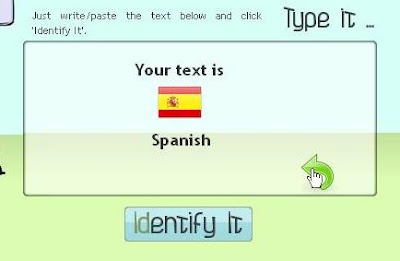
Using LangID you can know in which language a text was written and then use an external service to translate it. The output of LangID is very simple they provide-
  1. English name of the language,
  2. the ISO code and
  3. an icon rapresenting the flag of one of the countries this language is spoken in

LangID uses Google Ajax API to identify the languages.
Currently they support 85 languages

How to use it-
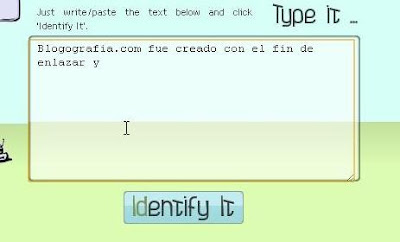
Just type the phrase or copy/paste from the webpage/application of which language you want to find out


and then click on Identify it button


and here is the output.
READ MORE - How To: Identify a Language of a webpage or app

Windows 4 All

Aug 30, 2009


Windows4all is a Microsoft Silverlight based online virtual operating system. It is a website that emulates an operating system inside a web browser.

Windows4all.com replicates the desktop environment of a modern operating system. The user can launch applications right away without installation. -Wikipedia


Besides desktop, taskbar, start menu and sidebar, currently it includes such applications:

  • File Explorer
  • Internet Explorer
  • Video Player
  • Rich text editor
  • RSS reader
  • Chat
  • Notepad
  • Paint
  • Calculator
  • Games like Chess, Solitaire, Spider etc.

Have a look at Windows4All

Tip: While using it press F11 and your browser goes in full screen mode and you will get the feel like you are running an actual OS.
READ MORE - Windows 4 All

Ever wondered what all NEW Firefox offers You

Aug 18, 2009


See what’s new, what’s been improved and what’s just as awesome as ever. This is all you are having to read in this post.

Lets begin with the features I liked the most

Security & Privacy

Instant Web Site ID
Want to be extra sure about a site’s legitimacy before you make a purchase? Click on a site favicon for an instant identity overview. Another click digs deeper: how many times have you visited? Are your passwords saved? Check up on suspicious sites, avoid Web forgeries and make sure a site is what it claims to be.

Forget This Site *new*
Having second thoughts about having visited a certain Web site? With this feature, you can remove every trace of that site from your browser—no questions asked!

Anti-Malware *improved*
Firefox protects you from viruses, worms, trojan horses and spyware. If you accidentally access an attack site, it will warn you away from the site and tell you why it isn’t safe to use. Firefox checks every part of a Web page before loading it to make sure nothing harmful is sneaking in the back door.

Clear Recent History *improved*
Clear all your private data or just your activity over the past few hours with a few quick clicks. You have full control over what to delete, and then your info is gone for good—on your own computer or the one at your local library. It’s that easy.

Anti-Virus Software
Firefox integrates elegantly with your antivirus software. When you download a file, your computer’s antivirus program automatically checks it to protect you against viruses and other malware, which could otherwise attack your computer.

Private Browsing
new Sometimes it’s nice to go undercover. When this feature is enabled, you won’t leave a single browsing fingerprint behind for others to discover. You can slip in and out of private browsing mode quickly, so it’s easy to return to what you were doing before as if nothing ever happened (you can also browse privately all the time).

looking for more here is a complete list
READ MORE - Ever wondered what all NEW Firefox offers You

Download all Windows version wallpaper

Aug 10, 2009

Microsoft has always changed its windows logo with every new version of Windows OS, this articlw will show you the changes in windows logo from the begining till WIndows 7.


This amazing pack bundle is provided to you via TheWindowsClub

Download Wallpack.
READ MORE - Download all Windows version wallpaper

I got my free Ubuntu CD today

Aug 4, 2009


Just 3 weeks before I have ordered for a free Ubuntu Linux CD, and today I received Free Ubuntu 9.04 Desktop Edition CD from Canonical. So, thought of sharing some Pictures with you all.

The packaging is really good the CD is freely shipped from Netherland directly to your home.


the package consisit 1 Ubuntu Cd with 34 Stickers.


If you are also interested in ordering free Ubuntu CD then just visit this link and click on Request a CD of Ubuntu Desktop Edition or Server Edition whichever you want and follow the instructions.
READ MORE - I got my free Ubuntu CD today

View System Uptime

You can view your system uptime or in other words for how long your system has been started by follwing the below given steps. This tutorial doesnot require any 3rd party tool to check your system time.
When Windows has gathered the data, the System Uptime can be found near the top of the report. For Windows XP it is very easy to find out -
  • Select Start > Run
  • In the Run Box: box type cmd and press OK
  • At the command prompt type systeminfo
you will get the screen like one below


The highlighted entry shows your system up time, if you look at the screen above you will find a lot of other relevant information of your computer.
The other information includes-

Host Name:
OS Name:
OS Version:
OS Manufacturer:
OS Configuration:
OS Build Type:
Registered Owner:
Registered Organization:
Product ID:
Original Install Date:
System Up Time:
System Manufacturer:
System Model:
System type:
Processor(s):
BIOS Version:
Windows Directory:
System Directory:
Boot Device:
System Locale:
Input Locale:
Time Zone:
Total Physical Memory:
Available Physical Memory:
Virtual Memory: Max Size:
Virtual Memory: Available:
Virtual Memory: In Use:
Page File Location(s):
Domain:
Logon Server:
Hotfix(s):

Note: The command systeminfo can be used only in Windows Xp Pro, You can copy the systeminfo.exe from Windows XP Pro to Windows XP Home (place it in \Windows\System32), it will run fine on XP Home.
READ MORE - View System Uptime

RGB Color Calculator & HEX Code Generator

Aug 3, 2009

Many times you see HEX code of a color in a lot of webpages but you don't know what color it actually is. This is the same case with RGB colors, and vice versa situation ie you want to use a HEX code of a certain color but you don't know the HEX code of it.

Keeping this in mind Greg Reimer created a script which allows you to Calculate RGB values of a certain color and also allows you to generate HEX code for a particular color.


If you like to view the code just go to DrPeterJones and right click on web page and choose view source.
READ MORE - RGB Color Calculator & HEX Code Generator

Know Processes runing in Taskmanager

Jul 10, 2009


Service Control Manager - services.exe
The Windows Service Control Manager (SCM) (SERVICES.EXE) is a remote procedure call (RPC) server that manages creating, deleting, starting and stopping of Windows services. It is started at system boot.

The service functions provide an interface for the following tasks performed by the SCM:
* Maintaining the database of installed services.
* Starting services and driver services either upon system startup or upon demand
* Enumerating installed services and driver services.
* Maintaining status information for running services and driver services.
* Transmitting control requests to running services.
* Locking and unlocking the service database.
For more visit: http://en.wikipedia.org/wiki/Service_Control_Manager


Session Manager Subsystem - smss.exe
Session Manager Subsystem, or smss.exe, is a component of the Microsoft Windows NT operating system, more exactly a system process. It is responsible for Starting winlogon.exe, the Windows logon manager.
For more visit: http://en.wikipedia.org/wiki/Session_Manager_Subsystem


spoolsv.exe
The spooler service is responsible for managing spooled print/fax jobs.


System Idle Process
In Windows NT operating systems, the System Idle Process contains one or more kernel threads which run when no other runnable thread can be scheduled on a CPU. The CPU time consumed by the System Idle Process is commonly of interest for end users, as it is a measure of the CPU utilization in their system which is easily accessible through Windows' Task Manager program.
For more visit:http://en.wikipedia.org/wiki/System_Idle_Process


Winlogon
In computing, Winlogon is the component of Microsoft Windows operating systems that is responsible for handling the secure attention sequence, loading the user profile on logon, and optionally locking the computer when a screensaver is running (requiring another authentication step). Winlogon handles interface functions that are independent of authentication policy.
For more visit: http://en.wikipedia.org/wiki/Winlogon


READ MORE - Know Processes runing in Taskmanager

Free - Its all we want! Where to get free legal torrents

Jun 8, 2009

We all know where to get our favourite music, movies, softwares etc... from internet yes obviously the best option is Torrents. But most of the torrrent sites a reputation for illegally distributing copyrighted content.
Some most popular sites are-

1. Iptorrents
2. MiniNova
3. Demonoid
4. ThePirateBay
5. IsoHunt
6. Torrentz
7. TorrentZEN
8. Btjunkie
9. Torrent-Finder


So for those who want to faught against Piracy here is a listing of some sites which provides you all your downloads for freee and yes legally.

1. Vuze - Music, videos, softwares
2. Public Domain Torrents - Classic movies and B-movies
3. eTree - Live concerts
4. Jamendo - Albums
5. Jamendo at isoHunt
6. MiniNova - Music, videos, software and games and ebooks.
7. Legit Torrents - Mostly software

If someone knows some other good site please let me know!

READ MORE - Free - Its all we want! Where to get free legal torrents

What is Bit Torrent

Apr 30, 2009


Let’s start from some basics

Basic File sharing: Client-Server and P2P
Skip ahead if you know this part.

A few years ago the Internet was pretty easily divided into two groups: servers and clients. (Just like at a restaurant.) There weren’t that many servers, but their primary job was to hold web pages and files to be downloaded. They didn’t do much other than sit there and wait for people like you to request a web page or file. You, as the client, probably didn’t share any files or web pages with anyone. This segregation was primarily due to the fact that it takes a lot of outgoing bandwidth to share stuff. In a time before broadband DSL and cable modems, back in the days of dialup, most people didn’t have the bandwidth, let alone the knowhow to share stuff on their own. This old system was called client-server, appropriately enough, and it is still used today for the vast majority of stuff on the Internet, including web pages.

With the advent of broadband technologies such as DSL and cable modems, the everyday user like you suddenly has a big chunk of bandwidth, not only for download, but also upload. Sharing files directly from your computer (without first sending them to a server) is now a reality. This is where p2p comes in. The acronym p2p stands for peer-to-peer, which basically means client to client. That is, you download files from people like you instead of from big servers, and in turn they download files from you. You share your files, your friends share their files, and everyone talks directly to each other.


Introduction
Bit Torrent is a peer-to-peer file sharing (P2P) communication protocol. A Bit Torrent client is the application which uses that protocol. You can use Bit Torrent to share and download any type of file you want. It uses a principal called tit-for-tat. This means that in order to receive files, you have to give them. Bit Torrent downloads different pieces of the file you want simultaneously from multiple computers.

Unlike other download methods, Bit Torrent maximizes transfer speed by gathering pieces of the file you want and downloading these pieces simultaneously from people who already have them. This process makes popular and very large files, such as videos and television programs, download much faster than is possible with other protocols.

Developer
The protocol is the brainchild of programmer Bram Cohen, who designed it in April 2001 and released a first implementation on 2 July 2001. It is now maintained by Cohen’s company Bit Torrent, Inc.

How Bit Torrent works?
Before understanding how bit torrent works let us know some bit torrent jargon
  • Seeder = A computer with a complete copy of a Bit Torrent file. Seeder’s uploads the file; to get a file you need at least 1 seed
  • Leecher =People who download files but do not share files on their own computer with others (also known as a peer). Leecher’s downloads the file uploaded by a seeder (he can also upload the file for others to download)
  • Tracker = A program that keeps track of who has what and what pieces or A server that manages the Bit Torrent file-transfer process
  • Swarm = the group of computers involved with any one particular torrent. Or A group of computers simultaneously sending (uploading) or receiving (downloading) the same file. The number of computers that the swarm contains is found by adding the number of seeds to the number of peers.
  • Ratio = the amount you have downloaded to the amount you have uploaded.
To share a file or group of files, a peer first creates a small file called a “torrent” (e.g.” MyFile.torrent”). This file contains metadata about the files to be shared and about the tracker, the computer that coordinates the file distribution. Peers that want to download the file first obtain a torrent file for it, and connect to the specified tracker, which tells them from which other peers to download the pieces of the file.

Users browse the web to find a torrent of interest, download it, and open it with a Bit Torrent client. The client connects to the tracker(s) specified in the torrent file, from which it receives a list of peers currently transferring pieces of the file(s) specified in the torrent. The client connects to those peers to obtain the various pieces. Such a group of peers connected to each other to share a torrent is called a swarm. If the swarm contains only the initial seeder, the client connects directly to it and begins to request pieces. As peers enter the swarm, they begin to trade pieces with one another, instead of downloading directly from the seeder.

Clients incorporate mechanisms to optimize their download and upload rates; for example they download pieces in a random order to increase the opportunity to exchange data, which is only possible if two peers have different pieces of the file.

Summary
  • Bit Torrent client software communicates with a tracker to find other computers running Bit Torrent that have the complete file (seed computers) and those with a portion of the file (peers that are usually in the process of downloading the file).
  • The tracker identifies the swarms, which is the connected computers that have all of or a portion of the file and are in the process of sending or receiving it.
  • The tracker helps the client software trade pieces of the file you want with other computers in the swarm. Your computer receives multiple pieces of the file simultaneously.
  • If you continue to run the Bit Torrent client software after your download is complete, others can receive .torrent files from your computer; your future download rates improve because you are ranked higher in the “tit-for-tat” system.
Downloading pieces of the file at the same time helps solve a common problem with other peer-to-peer download methods: Peers upload at a much slower rate than they download. By downloading multiple pieces at the same time, the overall speed is greatly improved. The more computers involved in the swarm, the faster the file transfer occurs because there are more sources of each piece of the file. For this reason, Bit Torrent is especially useful for large, popular files.

The big differences with Torrents compared to other P2P networks are:
a) I don’t have to give the whole file to each person to get it out there - I can give a bit to each person
b) Once I have given a bit out, its availability has just increased, because someone else can then also give it out, and so on and so on. the speed of a torrent will generally get better as more and more people want it - unlike Soul Seek or other P2P apps where you just wait longer to get it!!
c) Torrents technically aren’t illegal. After all, a torrent is just a tiny little file with no copyrighted content. It’s a bit muddy water here though, as they can facilitate the transfer of copyrighted content.

Indexing
The Bit Torrent protocol provides no way to index torrent files. As a result, a comparatively small number of websites have hosted the large majority of torrents linking to (possibly) copyrighted material, rendering those sites especially vulnerable to lawsuits. Several types of websites support the discovery and distribution of data on the Bit Torrent network.
Public tracker sites such as The Pirate Bay allow users to search in and download from their collection of .torrent files; they also run Bit Torrent trackers for those files. Users can typically also upload .torrent files for content they wish to distribute.

Private tracker sites such as Demonoid operate like public ones except that they restrict access to registered users and keep track of the amount of data each user uploads and downloads, in an attempt to reduce leeching.

There are specialized tracker sites such as FlixFlux for films, bitme for educational content, fullcaliber.be for metal music, PureTnA for pornographic content, and TV torrents for television series. Often these will also be private.

Search engines allow the discovery of .torrent files that are hosted and tracked on other sites; examples include Mininova, Monova, BTJunkie, Torrentz and isoHunt. These sites allow the user to ask for content meeting specific criteria (such as containing a given word or phrase) and retrieve a list of links to .torrent files matching those criteria. This list is often sorted with respect to relevance or number of seeders. Bram Cohen launched a Bit Torrent search engine on http://search.bittorrent.com/ that commingles licensed content with search results.
Limitations and security vulnerabilities

Lack of anonymity
Bit Torrent does not offer its users anonymity. It is possible to obtain the IP addresses of all current, and possibly previous, participants in a swarm from the tracker. This may expose users with insecure systems to attacks.

The leech problem
Bit Torrent file sharers, compared to users of client/server technology, often have little incentive to become seeders after they finish downloading. The result of this is that torrent swarms gradually die out, meaning a lower possibility of obtaining older torrents. Some Bit Torrent websites have attempted to address this by recording each user’s download and upload ratio for all or just the user to see, as well as the provision of access to newer torrent files to people with better ratios. Users who have low upload ratios may see slower download speeds until they upload more. This prevents (statistical) leeching, since after a while they become unable to download much faster than 1-10 kB/s on a high-speed connection. Some trackers exempt dial-up users from this policy, because they cannot upload faster than 1-3 kB/s.

The cheater problem
There are “cheating” clients like BitThief which claim to be able to download without uploading, and because of this can sometimes download faster than regular clients. Such exploitation negatively affects the cooperative nature of the Bit Torrent protocol.

Some Important Things to Remember
  • Keep seeding till you achieve at least a 1:1 RATIO!!!
  • Once you have the file, it’s no good just closing your client and forgetting about it. In order to allow it to be shared for others you MUST continue to seed.
  • You are not invisible when you are in a swarm. Others, including copyright owners if they so wished, can see your IP when you are downloading or uploading a file.
  • If you use a torrent site which has a forum attached, take the time to say thanks to the poster of the torrent. It only takes a moment.
  • The speed at which you download is determined by things such as the Seed to Peer ratio, the seed(ers) upload bandwidth and of course your available download bandwidth. Try to download torrents that have lots of seeders and few peers in order to get faster speeds.
Some good sites
1.Public tracker sites The Pirate Bay.org (my best site)
2.Private tracker sites Demonoid (for registered users)
3.FlixFlux for films
4.bitme for educational content
5.fullcaliber.be for metal music
6.PureTnA for pornographic content
7.ICTorrent.com a forum based torrent site also contains a large no of useful torrents.

Last words
Bit Torrent is perfectly legal to use. However, it is illegal to download copyrighted materials in most countries. So if the file you’re downloading is copyrighted, then what you’re doing is not legal. Also never upload any copyrighted material on net and never seed any such file. If you have read the above article carefully then you will notice that your IP Addresses are not hidden. Help to protect n prevent PIRACY.

References
1. HowStuffWorks.com
2. Wikipedia
3. Basic File sharing: Client-Server and P2P: Don’t remember the source it is somewhat like tweaking Bit torrent and so on…
4. Some Important Things to Remember: Taken from ICTorrent.com Forums but don’t remember the author.

READ MORE - What is Bit Torrent

What is Joomla?

Apr 28, 2009


What is Joomla?
Joomla is an award-winning content management system (CMS), which enables you to build Web sites and powerful online applications. Many aspects, including its ease-of-use and extensibility, have made Joomla the most popular Web site software available. Best of all, Joomla is an open source solution that is freely available to everyone.

What’s a content management system (CMS)?
A content management system is software that keeps track of every piece of content on your Web site, much like your local public library keeps track of books and stores them. Content can be simple text, photos, music, video, documents, or just about anything you can think of. A major advantage of using a CMS is that it requires almost no technical skill or knowledge to manage. Since the CMS manages all your content, you don’t have to.

What are some real world examples of what Joomla! can do?

Joomla is used all over the world to power Web sites of all shapes and sizes. For example:
  • Corporate Web sites or portals
  • Corporate intranets and extranets
  • Online magazines, newspapers, and publications
  • E-commerce and online reservations
  • Government applications
  • Small business Web sites
  • Non-profit and organizational Web sites
  • Community-based portals
  • School and church Web sites
  • Personal or family homepages


Who uses Joomla?
Here are just a few examples of Web sites that use Joomla:
United Nations (Governmental organization) - http://www.unric.org
MTV Networks Quizilla (Social networking) - http://www.quizilla.com
L.A. Weekly (Online publication) - http://www.laweekly.com
IHOP (Restaurant chain) - http://www.ihop.com
Harvard University (Educational) - http://gsas.harvard.edu
Citibank (Financial institution intranet) - Not publicly accessible
The Green Maven (Eco-resources) - http://www.greenmaven.com
Outdoor Photographer (Magazine) - http://www.outdoorphotographer.com
PlayShakespeare.com (Cultural) - http://www.playshakespeare.com
Senso Interiors (Furniture design) - http://www.sensointeriors.co.za

More examples of companies using Joomla can be found in the Joomla Site Showcase Forum.

Read more here


READ MORE - What is Joomla?

Directx Explained

Apr 27, 2009


Ever wondered just what that enigmatic name means?
Gaming and multimedia applications are some of the most satisfying programs you can get for your PC, but getting them to run properly isn’t always as easy as it could be. First, the PC architecture was never designed as a gaming platform. Second, the wide-ranging nature of the PC means that one person’s machine can be different from another. While games consoles all contain the same hardware, PCs don’t: the massive range of difference can make gaming a headache.

To alleviate as much of the pain as possible, Microsoft needed to introduce a common standard which all games and multimedia applications could follow – a common interface between the OS and whatever hardware is installed in the PC, if you like. This common interface is DirectX, something which can be the source of much confusion.

DirectX is an interface designed to make certain programming tasks much easier, for both the game developer and the rest of us who just want to sit down and play the latest blockbuster. Before we can explain what DirectX is and how it works though, we need a little history lesson.
DirectX history


Any game needs to perform certain tasks again and again. It needs to watch for your input from mouse, joystick or keyboard, and it needs to be able to display screen images and play sounds or music. That’s pretty much any game at the most simplistic level.
Imagine how incredibly complex this was for programmers developing on the early pre-Windows PC architecture, then. Each programmer needed to develop their own way of reading the keyboard or detecting whether a joystick was even attached, let alone being used to play the game. Specific routines were needed even to display the simplest of images on the screen or play a simple sound.

Essentially, the game programmers were talking directly to your PC’s hardware at a fundamental level. When Microsoft introduced Windows, it was imperative for the stability and success of the PC platform that things were made easier for both the developer and the player. After all, who would bother writing games for a machine when they had to reinvent the wheel every time they began work on a new game? Microsoft’s idea was simple: stop programmers talking directly to the hardware, and build a common toolkit which they could use instead. DirectX was born.

How it works?
At the most basic level, DirectX is an interface between the hardware in your PC and Windows itself, part of the Windows API or Application Programming Interface. Let’s look at a practical example. When a game developer wants to play a sound file, it’s simply a case of using the correct library function. When the game runs, this calls the DirectX API, which in turn plays the sound file. The developer doesn’t need to know what type of sound card he’s dealing with, what it’s capable of, or how to talk to it. Microsoft has provided DirectX, and the sound card manufacturer has provided a DirectX-capable driver. He asks for the sound to be played, and it is – whichever machine it runs on.

From our point of view as gamers, DirectX also makes things incredibly easy – at least in theory. You install a new sound card in place of your old one, and it comes with a DirectX driver. Next time you play your favourite game you can still hear sounds and music, and you haven’t had to make any complex configuration changes.

Originally, DirectX began life as a simple toolkit: early hardware was limited and only the most basic graphical functions were required. As hardware and software has evolved in complexity, so has DirectX. It’s now much more than a graphical toolkit, and the term has come to encompass a massive selection of routines which deal with all sorts of hardware communication. For example, the DirectInput routines can deal with all sorts of input devices, from simple two-button mice to complex flight joysticks. Other parts include DirectSound for audio devices and DirectPlay provides a toolkit for online or multiplayer gaming.
DirectX versions
The current version of DirectX at time of writing is DirectX 9.0. This runs on all versions of Windows from Windows 98 up to and including Windows Server 2003 along with every revision in between. It doesn’t run on Windows 95 though: if you have a machine with Windows 95 installed, you’re stuck with the older and less capable 8.0a. Windows NT 4 also requires a specific version – in this case, it’s DirectX 3.0a.

With so many versions of DirectX available over the years, it becomes difficult to keep track of which version you need. In all but the most rare cases, all versions of DirectX are backwardly compatible – games which say they require DirectX 7 will happily run with more recent versions, but not with older copies. Many current titles explicitly state that they require DirectX 9, and won’t run without the latest version installed. This is because they make use of new features introduced with this version, although it has been known for lazy developers to specify the very latest version as a requirement when the game in question doesn’t use any of the new enhancements. Generally speaking though, if a title is version locked like this, you will need to upgrade before you can play. Improvements to the core DirectX code mean you may even see improvements in many titles when you upgrade to the latest build of DirectX. Downloading and installing DirectX need not be complex, either.

Upgrading DirectX
All available versions of Windows come with DirectX in one form or another as a core system component which cannot be removed, so you should always have at least a basic implementation of the system installed on your PC. However, many new games require the very latest version before they work properly, or even at all.

Generally, the best place to install the latest version of DirectX from is the dedicated section of the Microsoft Web site, which is found at www.microsoft.com/windows/directx. As we went to press, the most recent build available for general download was DirectX 9.0b. You can download either a simple installer which will in turn download the components your system requires as it installs, or download the complete distribution package in one go for later offline installation.
Another good source for DirectX is games themselves. If a game requires a specific version, it’ll be on the installation CD and may even be installed automatically by the game’s installer itself. You won’t find it on magazine cover discs though, thanks to Microsoft’s licensing terms.

Diagnosing problems
Diagnosing problems with a DirectX installation can be problematic, especially if you don’t know which one of the many components is causing your newly purchased game to fall over. Thankfully, Microsoft provides a useful utility called the DirectX Diagnostic Tool, although this isn’t made obvious. You won’t find this tool in the Start Menu with any version of Windows, and each tends to install it in a different place.

The easiest way to use it is to open the Start Menu’s Run dialog, type in dxdiag and then click OK. When the application first loads, it takes a few seconds to interrogate your DirectX installation and find any problems. First, the DirectX Files tab displays version information on each one of the files your installation uses. The Notes section at the bottom is worth checking, as missing or corrupted files will be flagged here.

The tabs marked Display, Sound, Music, Input and Network all relate to specific areas of DirectX, and all but the Input tab provide tools to test the correct functioning on your hardware. Finally, the More Help tab provides a useful way to start the DirectX Troubleshooter, Microsoft’s simple linear problem solving tool for many common DirectX issues.
source: Internet doesent remember the name and site of original author


READ MORE - Directx Explained

What’s your site worth?

Apr 26, 2009

As an independent website or blog operator, it is in your best interest to always know if you are maximizing your site’s earning potential through advertising, affiliate marketing, and independent advertising arrangements. This free tool will analyze your site, and let you know how well it’s being monetized, and what value you could sell it for.


The following two sites are best for calculating how much worthful is your site

and

I like both equally,  stimator gives a detailed report whereas website value calculator gives real value (in dollors) of our site.

READ MORE - What’s your site worth?

Religious search

Apr 25, 2009


So you are a religious guy, and want to search some religious content but you know pnly one search engine that is google. It’s tough to get out something from google that you were seeking but no problem now!


As a new search engine has arrived which searches only religious content. Well, most likely you can’t find what you want on Google or Yahoo as fast as what MyGodSearch.

It enables religous content to search over 2,000 sites about religion using a Google-powered search and the results are pretty relevant to the keyword you’ve entered.
READ MORE - Religious search

Web 3.0 by Eric Schmidt

Apr 24, 2009

Here is what Eric Schmidt (Google’s CEO) has to say on web3.0

READ MORE - Web 3.0 by Eric Schmidt

About Author

My photo
Working as an Automation Analyst, Ritesh is very passionate about developing tools and apps. His profile contains a long list of tools developed for Windows and apps for Android platform.