Kaspersky Antivirus 2009 Free 6 months License

Aug 31, 2009

I recently came across this tread in TWC forum and taught sharing with you too. Windows Live in Collaboration with Kaspersky is Giving free 6 year license of Kaspersky Antivirus 2010. This is promotional offer from MSN.

How to obtain the key?
If you have Windows live messenger than
  • Login to your Windows Live Messenger


  • Add msn.help@live.cn in your contact
  • Open a Chat window and paste the following
  • 我要卡巴斯基激活码


  • This will return a license key to u through chat itself.
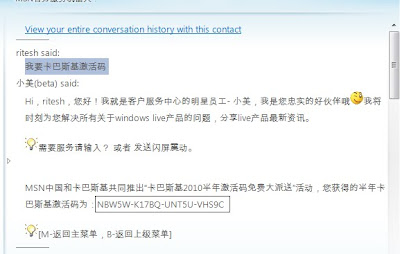
Now Download Kaspersky Antivirus 2010 Run it and activate it using this key.
READ MORE - Kaspersky Antivirus 2009 Free 6 months License

Windows 4 All

Aug 30, 2009


Windows4all is a Microsoft Silverlight based online virtual operating system. It is a website that emulates an operating system inside a web browser.

Windows4all.com replicates the desktop environment of a modern operating system. The user can launch applications right away without installation. -Wikipedia


Besides desktop, taskbar, start menu and sidebar, currently it includes such applications:

  • File Explorer
  • Internet Explorer
  • Video Player
  • Rich text editor
  • RSS reader
  • Chat
  • Notepad
  • Paint
  • Calculator
  • Games like Chess, Solitaire, Spider etc.

Have a look at Windows4All

Tip: While using it press F11 and your browser goes in full screen mode and you will get the feel like you are running an actual OS.
READ MORE - Windows 4 All

Make your blog interactive with Wibiya

Aug 29, 2009

Before strating lets know What Wibiya is?

Wibiya enables blogs to integrate the most exciting services, applications and widgets of their choice into their blog through customized web-based toolbars.
Our platform offers a one-stop solution for integrating, managing and tracking third-party applications.

Currently we offer a fixed set of tools such as creating a blog community via facebook connect,
enabling twitter alerts on your blog and enabling post navigation but there is a lot to wait for as we will be adding more and more application through time.


I didn't understand
Ok in simple words wibiya is a bottom bar which remains in your blog/website.

The bar is a semi-transparent overlay on your site which is home to a number of application or buttons. You can choose which buttons you want to use. Most are for your readers to find or share contents of your site easier or connect your readers with each other or you as the author. - Makeuseof.com


Following applications you can customize/add in wibiya

  1. Blog search
  2. Translate current page with Google Translater
  3. Recent posts
  4. Random post
  5. Games
  6. Subscribe to RSS
  7. Share with Social bookmarking sites
  8. Facebook Connect
  9. Twitter console
You can switch on of these applications according to your needs.

READ MORE - Make your blog interactive with Wibiya

Top Tricks, Tips and Hacks (August 09)

Aug 27, 2009

READ MORE - Top Tricks, Tips and Hacks (August 09)

About Author

My photo
Working as an Automation Analyst, Ritesh is very passionate about developing tools and apps. His profile contains a long list of tools developed for Windows and apps for Android platform.